Original Voice Removal in Auto Mixing
This article explains how original voice removal works when Auto Mixing is enabled in dubbing projects, and how timing boundaries and crossfade settings affect the final result.
Overview
When Auto Mixing is used, the system removes the original dialogue track and replaces it with background audio.
The accuracy of this process depends on the speech boundaries inherited from the Transcription task.
How speech boundaries are defined
Step 1. Transcription defines timings
Speech boundaries are taken from the original speech timings generated during the Transcription task.
In most cases, these timings are accurate.
However, they may occasionally contain issues, such as:
Missing dialogue lines
Segments extending beyond actual speech (e.g. breathing, laughter)
Step 2. Boundaries are used for voice removal
These boundaries define where the original voice should be removed during Auto Mixing.
To review them:
Open the Lip-sync task.
Enable Show voice removal boundaries on the timeline.
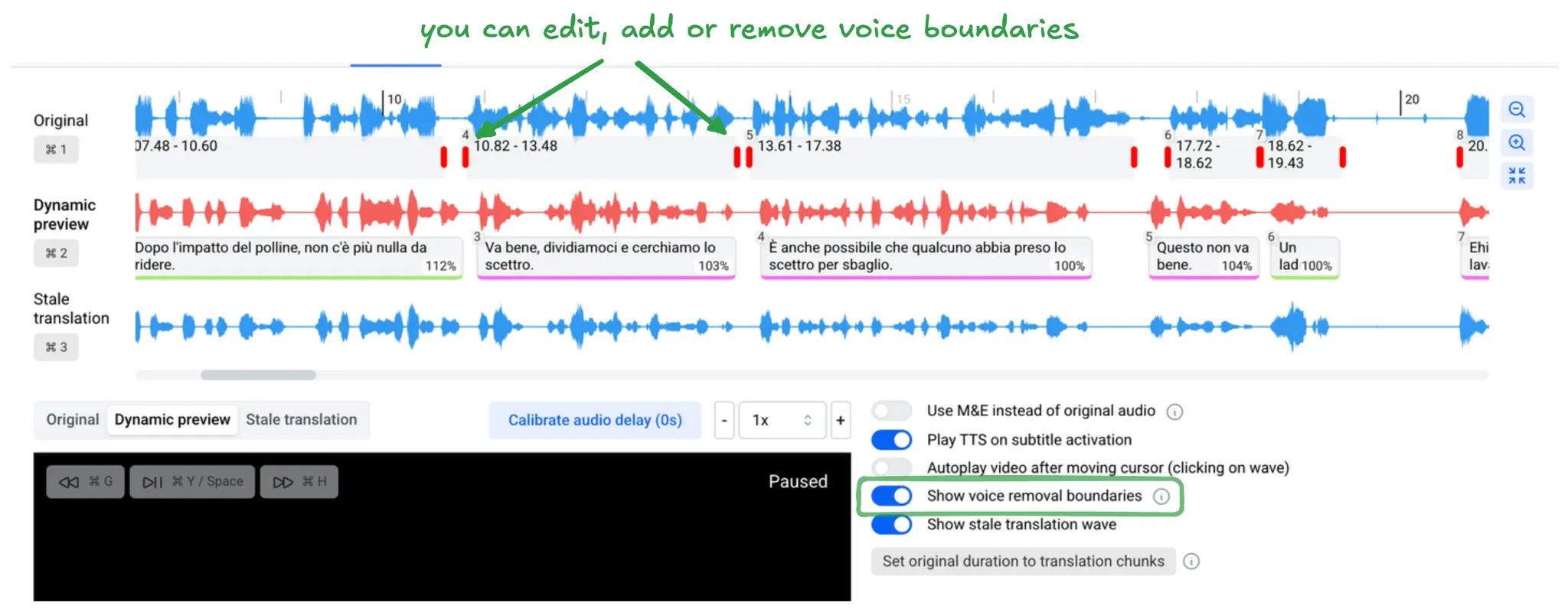
How original voice is removed
Step 3. Select the removal method
The system removes the original voice in one of the following ways:
M&E track replacement, if an M&E track is available
AI-based speech removal, if no M&E track is provided
Step 4. Apply crossfade smoothing
Voice removal is applied with crossfade smoothing.
This ensures a smooth transition between removed dialogue and background audio.
Crossfade smoothing:
Gradually fades out the original voice
Blends in the background audio
Reduces audible artifacts and abrupt cuts
Configure crossfade duration
Step 5. Adjust the crossfade parameter
You can control the fade duration using the Crossfade parameter.
To adjust it:
Open the Lip-sync or Auto mixing task.
Go to Sound → Advanced.
Set the Crossfade value.
Recommended values
Default: 300 ms
Shorter values (100 ms or 50 ms) may work better depending on the content
How close segments are handled
Step 6. Understand short gaps
If the gap between two speech segments is less than twice the crossfade value, the audio between them will also be removed.
This behavior:
Prevents sudden volume changes
Result
Accurate speech boundaries combined with appropriate crossfade settings ensure:
Clean removal of the original voice
Smooth background transitions
Stable audio levels in the final mix
Was this helpful?
Still need help? Share an idea