Getting started
Emotional Transfer for Dubbing
AI Dubbing Enhancement Toolkit
Task Editor: Tools and Controls
Workflows, Projects & Tasks
Create a New Project
Voices Glossary
How to Preserve Original Voice in Selected Segments through dubbing stages
File Exports from Dubformer Studio
Assign a Task to an Editor
Pre-assign Editors Across the Project Pipeline
Changing the Assignee for a Task
Delete a Project
Delete a Video from a Project
Dubbing Workflow: Creating and Completing a Project in Studio
Voiceover Project: End-to-End Workflow in Dubformer Studio
Subtitling in Dubformer Studio
Uploading Custom Scripts in Excel or CSV format
Uploading Custom Scripts in SRT or VTT format
Pivot Language
Clone a media project setup
Audio Description
Automated Voice Selection with Voice Labels
Workspace and User management
πŸ“
Changelog
Dubformer Studio
    Home
  1. Workflows, Projects & Tasks
  2. Assign a Task to an Editor

Assign a Task to an Editor

Use this flow to assign a project task to an editor and ensure the task is ready to start.

  1. Open the project.

  2. Hover over the task block you want to assign.
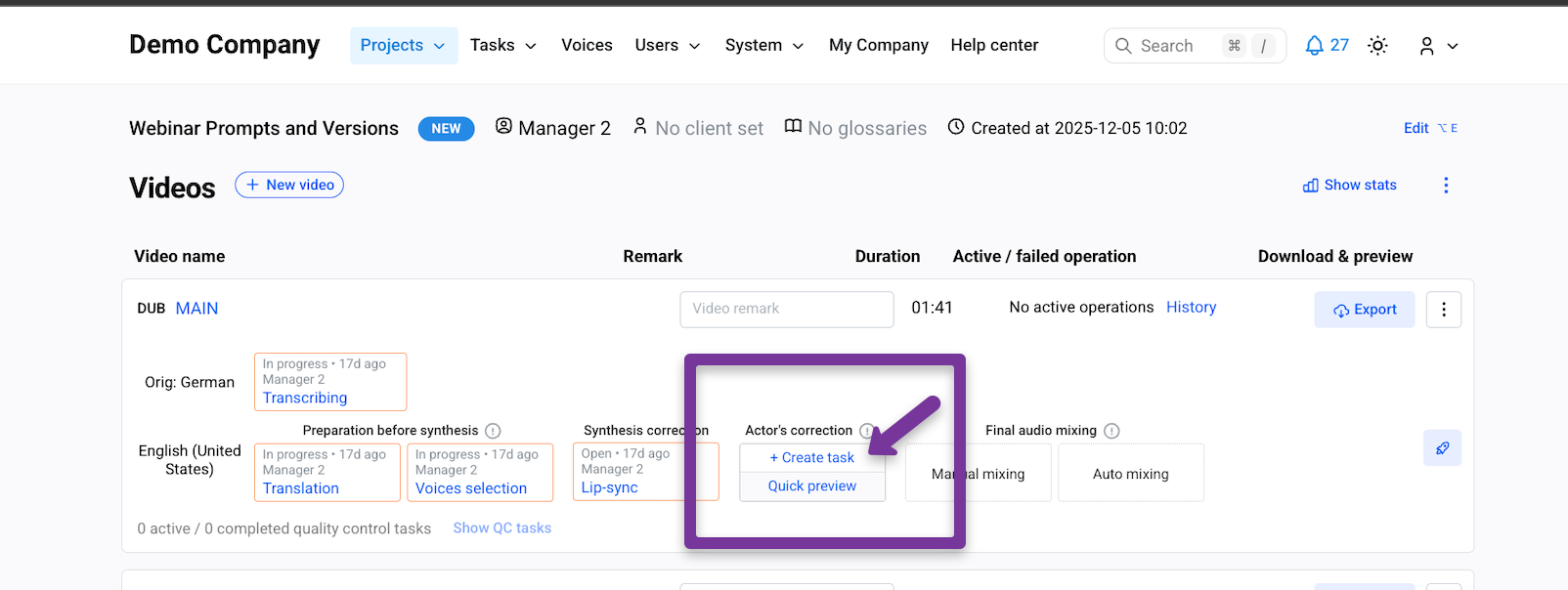
  1. Click Create task

  2. Select an editor from the assignee dropdown list.

  3. (Optional) Click Check the project for errors to verify project details before assignment.

  4. Click Create task

Note:
Users with manager role can access and assign all projects and tasks.

Was this helpful?