Library voices
How to select library voices
S-tier voices can be selected in Voice selection or Prooflistening / Lip sync/Audio description tasks.
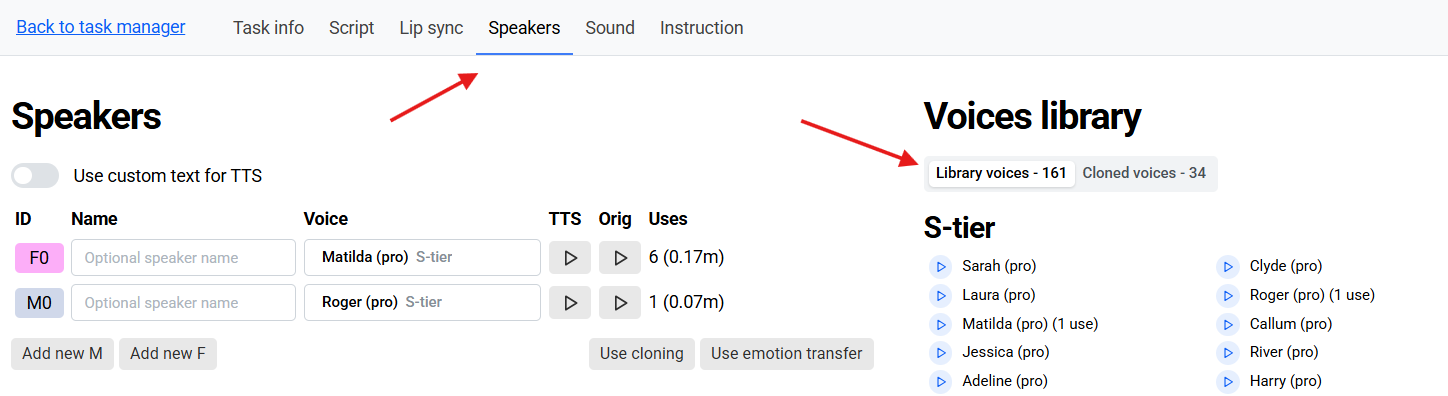
Open Speakers.
Select a speaker.
Open Library voices.
S-tier voices are listed at the top.
Select a voice.
Save changes and process the video.
Editing tools:
S-tier voices have almost the same set of editing tools as A-tier voices and voice clones. The main difference is that instead of the familiar prompting mechanism, S-tier voices use tags in square brackets that can be placed in any part of the chunk to change the voice characteristics.
Text editing
A lot can be achieved simply by editing the text of your translated phrase. Commas and exclamation marks bring out the desired intonation. Capitalized words or quotation marks influence logical stress. If the synthesis mispronounces a foreign word of a proper name, you can spell it “as it sounds”.
Versions
Unlimited number of synthesis versions can be generated for each phrase. They are generated five at a time.
While editing a phrase, click on the versions button.
Generate as many versions as you need.
Select the best one.
Stability
When generating synthesis versions, you can adjust the Stability parameter. The lower the stability, the more versions will differ from each other. If you are using tags to adjust the intonation, we advise to keep the stability at 0.5 or lower, so you could have more variation.
Tags
Use tags in square brackets to change the intonation, emotional coloring or other characteristics of the chunk. Tags can be inserted in any part of the sentence, wherever you need them. You can add as many tags as needed into a chunk, either in combinations, or different tags for different parts of the chunk. There is no pre-defined list of tags. You can write anything in the square brackets and see if it works as you intended. Here are several examples to give you an idea what kind of modifications you can achieve with tags.
pauses: [short pause], [long pause]
emotional coloring: [sarcastic], [curious], [excited], [crying], [happy], [mischievously]
vocal characteristics: [whispers], [in a low voice], [strong German accent], [sings]
non-speech sounds: [sigh], [exhale], [laughter], [snort], [swallows], [gulps]
environmental noises: [applause], [explosion], [gunshot]
For example, this is what a chunk with multiple tags might look like:
[surprised] Wait, [whisper] where are my cookies? [gasps] [angry] You ate them! [gunshot]
Not all the tags will work equally well. If your tag doesn’t work as desired, try different wording, use more common expressions so that the system would more likely understand what you mean.
There can also be some limitations set by the voice that you choose. Not all the voices are universal. They get some emotions better than the others. If the voice has been trained to shout, it may be a challenge to make it whisper, and vice versa.
A-tier style prompting
Prompts can be used, but they are not effective with S-tier voices, so we recommend using tags instead.
A-tier style pause tags
A-tier style Pause tags are not supported. If you need to create a pause within a phrase, the following approaches are recommended:
use a pause tag in square brackets, for example: [long pause], [short pause]
use punctuation,
split the phrase in two and adjust the timings.
Addressing challenges
A word is mispronounced. How do I make the voice pronounce it correctly?
If speech synthesis is mispronouncing an unfamiliar word, for example, a foreign name, you can change its spelling and write it “as it sounds”. Remember that you are working on dubbing, not subtitling. It doesn’t matter what spelling and punctuation you use, as long as it is pronounced properly.
How do I emphasize a different word in a sentence?
If the logical stress in the phrase is wrong (”It WAS my sister” vs. “It was MY sister”), you can try to put an emphasis on the desired word by capitalizing it or by taking it into quotation marks.
The speech in the original is much slower, so my translated phrase finishes too early
There are four ways to make your translated phrase longer so it would “cover” the extent of the original phrase:
use a tag to make the voice speak slower. For example: [slowly].
stretch the phrase on the timeline, but keep in mind that stretching it too much may result in unnatural speech and sound distortions. It is advised to keep playback speed within the range of 95-110%.
split the phrase into several chunks and adjust them on the timeline according to your needs,
rephrase the translation to make it longer. Add filler words if necessary.
The voice is not expressive enough, I can’t get the desired emotion
Make sure the punctuation and wording of a chunk corresponds to the emotion.
Lower the stability and look at more versions.
Try different tags or tag combinations.
If the voice is still not emotional enough, maybe it is better to select another voice for this speaker.